Why your AI lifestyle product photos look fake (and why it matters)
The primary reason AI lifestyle product photos often look inauthentic boils down to a lack of environmental cohesion. Products appear 'pasted on' rather than naturally integrated into the scene. This manifests as incorrect shadows, inconsistent lighting, mismatched reflections, or textures that don't react realistically with their surroundings. When humans are involved, the 'uncanny valley' effect can be jarring, with stiff poses or unnatural expressions that betray the AI origin. These imperfections cost you more than just a pretty picture; they undermine your brand's credibility, reduce conversion rates, and force endless, time-consuming manual edits in post-production. You're not just creating images; you're building a brand perception. Subpar visuals translate directly to a subpar brand experience.As of June 2026, the landscape of AI image generation is rapidly evolving. Innovations like Midjourney's Scene Cohesion V3 update and the open-source PhotoFlow-XL model are directly tackling these issues, offering improved consistency and human realism. MyUP.ai integrates these cutting-edge capabilities into a streamlined workflow, ensuring your product visuals are not just generated, but genuinely crafted for authenticity.
The MyUP foundation: Brandkit for consistency, advanced models for realism
At the core of generating truly photorealistic and on-brand lifestyle product photos with MyUP.ai is your Brandkit. This isn't just a style guide; it's a living visual identity that automatically applies your brand's colors, fonts, logo, and overall style to every asset you create. By building your Brandkit once from a URL, you ensure that every AI-generated image, from a simple product shot to a complex lifestyle scene, adheres to your established visual standards. This consistency is paramount for avoiding the 'fake' look across an entire campaign.MyUP leverages advanced image generation models that provide the granular control necessary for photorealism. These models are designed with capabilities akin to Flux AI's 'Real-World Integration,' allowing for precise control over how your product interacts with its environment. This means realistic shadows that fall correctly, reflections that mirror the scene, and textures that react to ambient light. The result is a product that looks like it genuinely belongs, not an afterthought. Your role is to validate and adjust, guiding MyUP's production to meet your exact vision.
Step 1: Crafting the perfect scene and product brief
Before generating a single pixel, define your product, its unique selling propositions, and the specific lifestyle scene you envision. Think about your target audience: where do they use this product? What emotions should the image evoke? A detailed prompt is your most powerful tool. Include specifics about the setting (e.g., 'a sun-drenched beach with gentle waves,' 'a cozy, minimalist living room'), lighting conditions (e.g., 'soft morning light,' 'dramatic golden hour'), and the product's placement and interaction within that scene. Reference images can also be incredibly helpful to convey the desired aesthetic and mood.On MyUP.ai, you'll input these details into a structured prompt interface that guides you to provide all necessary information. The more specific and descriptive you are, the better the AI can interpret your vision and deliver a result that aligns with your expectations. This initial briefing stage is where you set the foundation for photorealism, ensuring the AI has a clear blueprint for the scene.
To begin setting up a product advertisement campaign with a strong visual direction, try this template:
Workflow code: #myup-j6sp-glnw
Fruit Advertisement Campaign
Drop your product straight into a lush, hyperrealistic pile of fresh sliced fruit. It takes your clean product shot, blends it into rich organic textures, and generates a premium, slow-motion falling animation ready for a luxury cosmetic or food ad.
Regenerate using your own assets.
Step 2: Achieving seamless product integration and environmental realism
The 'pasted-on' look is the most common pitfall in AI product photography. To avoid it, your product must integrate seamlessly into the scene, respecting the environment's physics and lighting. This means accurate shadows that match the light source, realistic reflections on glossy surfaces, and textures that respond to the ambient light and materials around them. MyUP.ai's underlying models are engineered to handle these complexities, simulating real-world physics to render your product convincingly.Our platform allows you to specify details like material properties (matte, glossy, metallic), the direction and intensity of light, and even the type of surface the product rests on. These controls, leveraging advanced techniques similar to Stable Diffusion's ControlNet extensions for semantic product placement, ensure that your product doesn't just appear in the scene, but becomes an intrinsic part of it. You can review initial generations, identify any areas where integration feels off, and provide feedback for iterative refinement. MyUP executes, and you validate, ensuring the final output meets your photorealism standards.
For a professional approach to integrating your product into a dynamic scene, use this workflow:
Workflow code: #myup-ysc9-ekcs
Professional Product Poster
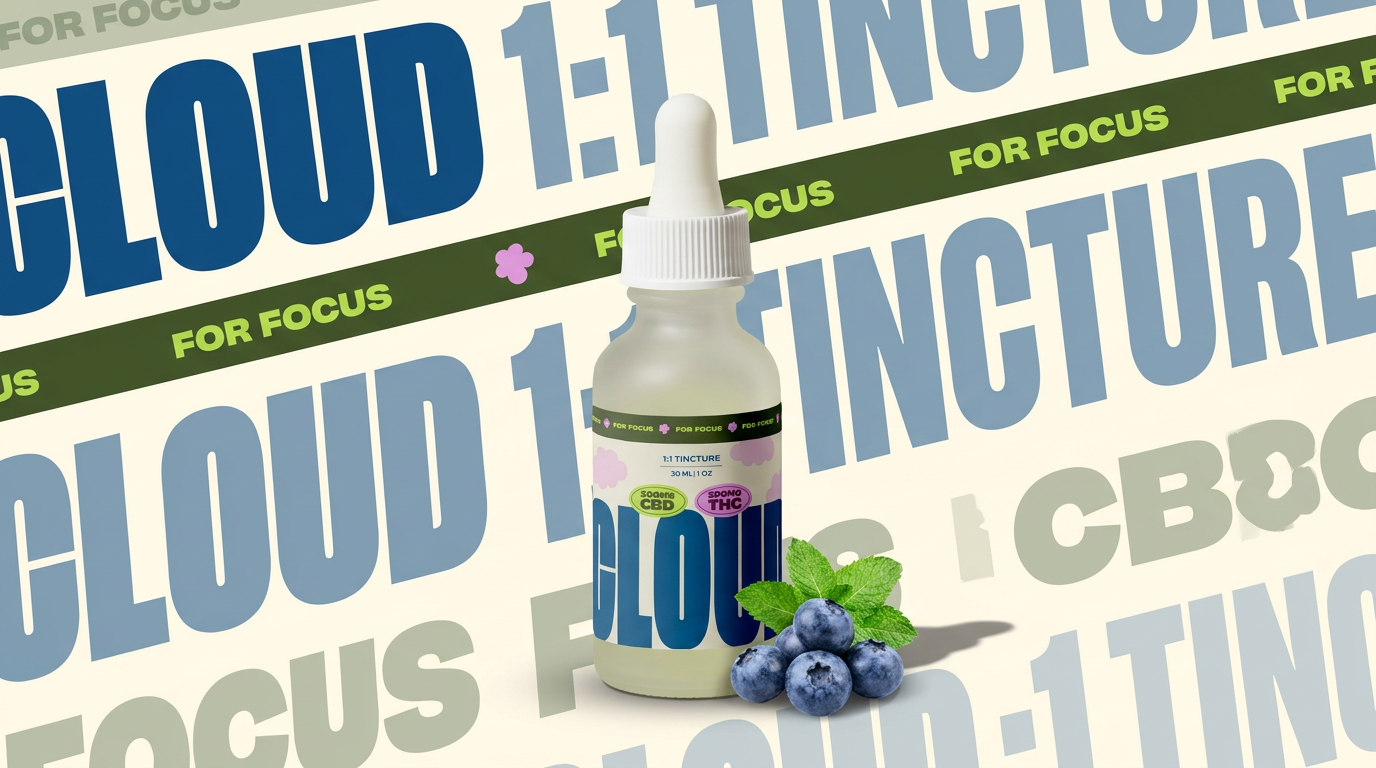
Turn any product shot into a clean, graphic landscape poster. It automatically pulls the text from your packaging to create a massive, semi-transparent repeated background pattern behind your item. Great for modern, typography-heavy brand showcases.
Regenerate using your own assets.
Step 3: Integrating authentic human interaction without the uncanny valley
Lifestyle product photography often features human models interacting with the product. This is where AI-generated images can quickly enter the 'uncanny valley' if not handled with care. Unnatural poses, stiff expressions, or awkward interactions immediately flag an image as artificial. MyUP.ai addresses this by utilizing models optimized for hyper-realistic human subjects and their natural interaction with objects, drawing on advancements seen in models like PhotoFlow-XL.When crafting your prompt, focus on natural actions and emotions. Instead of just 'a person holding a mug,' try 'a person with a warm, genuine smile, casually holding a ceramic mug with both hands, steam rising, looking out a window.' MyUP's AI will generate models with more authentic poses, expressions, and realistic skin and fabric textures, ensuring they complement your product rather than detracting from it. Remember, the goal is to create a believable moment, not just a static display.
To generate lifestyle shots featuring authentic human interaction with your product, consider this template:
Workflow code: #myup-xjsb-hirr
Bold Portrait Food Advertising Photo

Get those high-impact, tight action shots of people actually enjoying your food brand. It drops your product right into a messy, realistic close-up bite shot that feels like a premium lifestyle campaign instead of a boring studio packshot.
Regenerate using your own assets.
Step 4: Scaling photorealism with consistent brand identity
Creating one photorealistic image is a win; creating a dozen for a campaign with absolute visual consistency is a strategic advantage. This is where MyUP.ai truly shines. Once your Brandkit is set up and you've refined a core aesthetic, MyUP can generate multiple, diverse lifestyle shots that all adhere to the same brand identity and visual style. This addresses the challenge of 'scene cohesion' across a series of images, a problem that tools like Midjourney's V3 update are also tackling.MyUP's automated workflows allow you to iterate on scenes, change product angles, or introduce new elements while maintaining the established look and feel. You can generate a wide array of content for social media, website banners, or ad campaigns, knowing that every image will be instantly recognizable as yours. This eliminates the manual effort of aligning disparate images and ensures your brand message remains unified and strong across all channels. For more on ensuring consistency, see our article on Why your AI fashion photography looks off (and the workflow that fixes it).
Refining your AI lifestyle photos: The human touch in MyUP's workflow
Even with the most advanced AI, the human eye remains the ultimate arbiter of quality and brand alignment. MyUP's workflow is built around this principle: the AI handles the heavy lifting of generation, but you maintain full creative control through iterative refinement. After initial generations, you can easily provide feedback, highlighting specific areas for improvement—whether it's adjusting a shadow, tweaking a reflection, or refining a model's expression. MyUP's agent-assisted creation allows you to guide the AI, ensuring the output perfectly matches your vision and brand standards.This collaborative approach means you're not just accepting what the AI produces; you're actively shaping it. You approve the final output, confident that it meets your exacting standards for realism and brand authenticity. This iterative process is crucial for achieving truly professional, market-ready visuals that avoid any hint of artificiality.
For a detailed product ad that benefits from this human-guided refinement, use this template:
Workflow code: #myup-iffs-sdef
Gourmand Candy Lip Gloss Ad
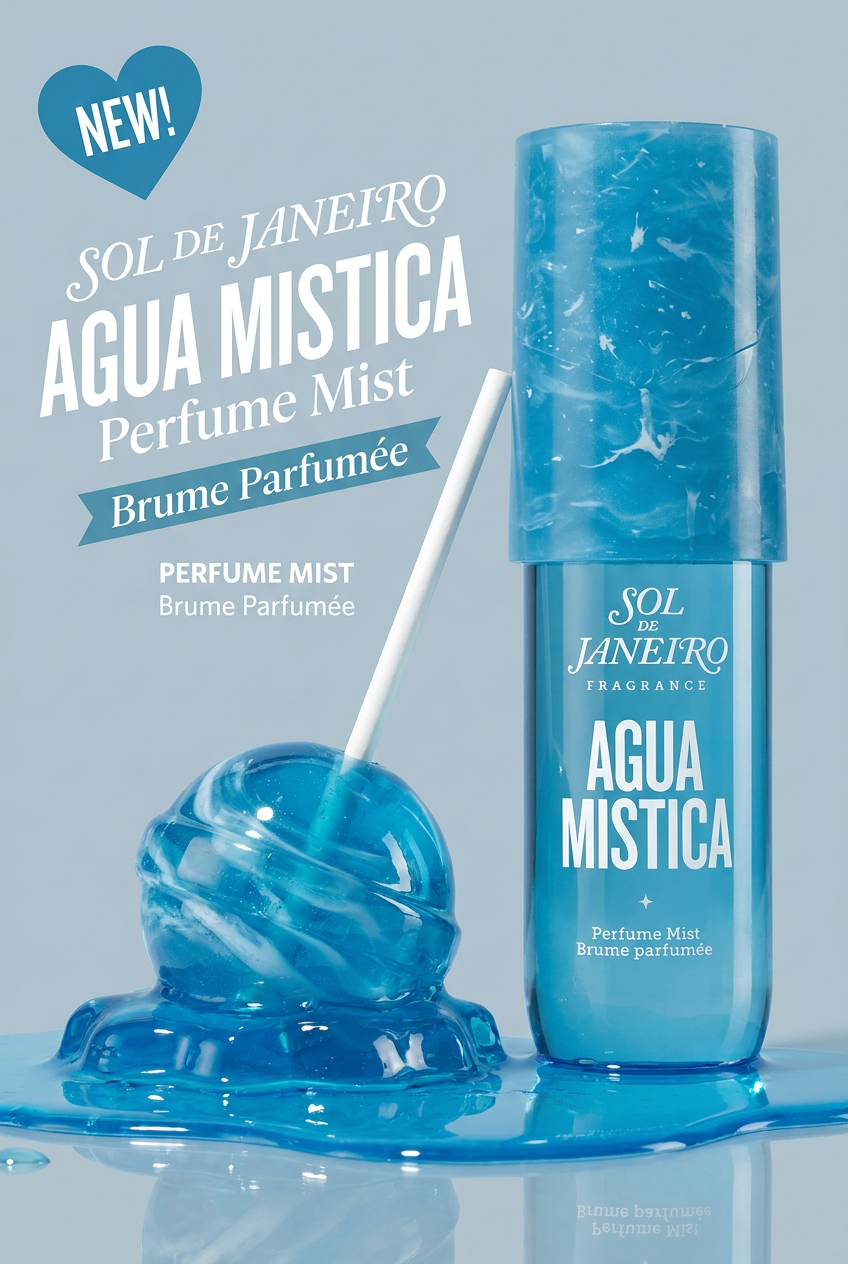
Drop your product photo in and watch it transform into a sleek, modern cosmetic ad. It automatically extracts your item's signature colors to build a vibrant, gourmand-style backdrop that matches perfectly.
Regenerate using your own assets.
Stop generating fake photos: Your workflow for authentic AI lifestyle visuals starts here
The era of fake-looking AI product photos is over. With MyUP.ai, you have a powerful workflow that combines advanced AI image generation with the precision of your Brandkit to produce hyper-realistic lifestyle product photos that genuinely elevate your brand. You get seamless product integration, authentic human interaction, and unwavering visual consistency across all your campaigns. This isn't just about speed; it's about delivering quality and authenticity at scale.Ready to transform your product photography and ensure your visuals always look real, professional, and on-brand? Start creating with MyUP.ai today and experience the difference a guided, intelligent workflow makes. Stop wasting time on endless retouches and start creating compelling, photorealistic lifestyle content that converts.
