
The release of Magnific AI's 'Story Mode' on September 4, 2026, generated excitement for its ability to create a sequence of thematically related images from a single starting point. It’s a fascinating feature for AI artists and visual storytellers. But as a marketer, brand owner, or agency creative, your job isn't just to create a sequence of pretty pictures. Your job is to launch a successful ad campaign.
This is where the excitement meets a hard reality: a great hero image, or even a series of them, is not a campaign. You need assets in multiple formats, with consistent branding, and often, you need video. The process of getting from that one great image to a full suite of ready-to-publish ads is where most creative projects stall, bogged down by a patchwork of disconnected tools.
The release of Magnific AI's 'Story Mode' on September 4, 2026, generated excitement for its ability to create a sequence of thematically related images from a single starting point. It’s a fascinating feature for AI artists and visual storytellers. But as a marketer, brand owner, or agency creative, your job isn't just to create a sequence of pretty pictures. Your job is to launch a successful ad campaign.
This is where the excitement meets a hard reality: a great hero image, or even a series of them, is not a campaign. You need assets in multiple formats, with consistent branding, and often, you need video. The process of getting from that one great image to a full suite of ready-to-publish ads is where most creative projects stall, bogged down by a patchwork of disconnected tools.
A single image doesn't run on multiple platforms
A modern ad campaign is a complex ecosystem. You need visuals for:
- Instagram & TikTok Stories: Vertical 9:16 video and static images.
- Facebook & Instagram Feeds: Square 1:1 or 4:5 images and carousels.
- YouTube Ads: Horizontal 16:9 video.
- Google Display Network: A dozen different banner sizes.
On top of that, every single asset must be instantly recognizable as your brand. This means consistent colors, fonts, logo placement, and overall aesthetic. Using a single-purpose tool like an upscaler, even a powerful one, only solves the very first step. The rest is a manual, time-consuming grind of resizing, recomposing, and rebranding in tools like Photoshop and Canva.
Magnific's 'Story Mode': for storyboarding, not production
Magnific AI excels at one thing: taking an image and enhancing it with incredible detail. Its 'Story Mode' extends this by creating variations on a theme. This is useful for creative exploration or building a storyboard. However, for a marketer with a launch deadline, it has critical limitations:
- No Format Control: It doesn't allow you to specify output formats like 9:16 for a Story or 1200x628 for a banner ad. You get what the AI gives you.
- No Brand Integration: You can't automatically apply your brand's specific fonts, colors, or logos. Maintaining consistency across a 'Story Mode' sequence is a manual post-production task.
- Images Only: It doesn’t create video, which is essential for social media advertising today.
Magnific delivers high-quality raw material, but it leaves the actual production of finished, campaign-ready assets entirely up to you.
The solution: from a single intention to a finished campaign
Instead of thinking about a sequence of tools, you need to think about your final intention: 'I want to launch an ad campaign for my new product.' This is the core principle of MyUP, the Creative Production Platform. You state your goal, and MyUP handles the entire production process from A to Z, delivering a complete set of finished creations ready to publish.
Here’s the practical method for turning a single idea into a full campaign using MyUP.
Step 1: Establish your visual identity with a Brandkit
Before you create anything, you need to ensure consistency. In MyUP, you create a Brandkit once by simply providing your website URL or uploading your logo and brand colors. MyUP automatically builds your visual identity—colors, fonts, and logo styles. From that point on, every asset you produce will be automatically on-brand. This solves the biggest challenge of using fragmented tools and directly addresses the need for an 'AI brand kit generator' that actually works in production.
Step 2: Generate a diverse set of campaign visuals
A campaign needs more than one type of image. With MyUP, you can use creative templates to generate an entire set of visuals from one concept. For example, if you're launching a new cosmetic, you can use the Luxury Skincare Product Ad Campaign (Template: #myup-vccl-cyv5). You provide your product idea, and it produces a complete set including a clean studio hero shot, an elegant lifestyle scene, and a macro detail shot—all perfectly on-brand. For an apparel brand, the Streetwear Photography (Template: #myup-hyfn-escm) can generate a full five-shot editorial lookbook from a single clothing design, giving you a variety of poses and angles instantly.
Luxury Skincare Product Ad Campaign

Create a polished luxury advertising set from a single beauty product image. This reusable 4-step workflow generates a clean studio hero shot, an elegant lifestyle scene, a macro product detail and a vertical social media composition while preserving the visual identity of the uploaded product. Designed for skincare, cosmetics and premium beauty products.
Regenerate using your own assets.
Streetwear Photography
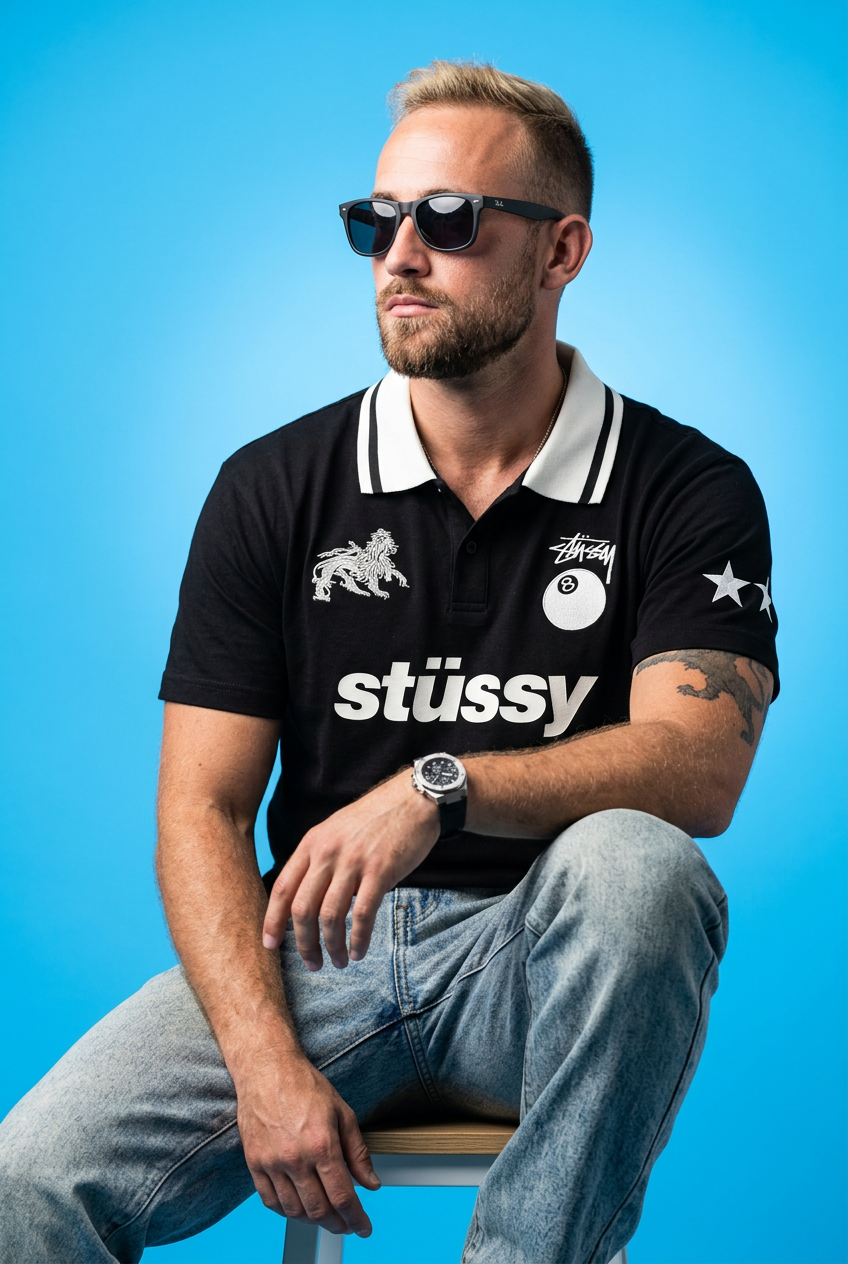
Drop your apparel design in to get a complete five-shot streetwear editorial campaign. It renders your clothing across a cohesive mix of high-fashion poses, from low-angle hero shots and mid-stride action to gritty macro close-ups.
Regenerate using your own assets.
Step 3: Create dynamic video ads from your static concept
Video is non-negotiable in modern advertising. This is a major gap with image-only tools. MyUP is a complete production platform that also creates video and animations. You can state an intention like, 'I want a high-end commercial for my new perfume,' and MyUP delivers a finished video. To execute this, you can use a template like the Luxury Perfume Brand Commercial Video (Template: #myup-mvtk-dmtt), which turns a simple product idea into a cinematic ad with beautiful lighting and motion, ready for social media.
Luxury Perfume Brand Commercial Video
Capture a cinematic glow that makes any subject look like a brand icon. This process blends a sharp, low-angle still with a fluid motion sequence to turn your product into the star of a golden hour commercial.
Regenerate using your own assets.
Step 4: Refine and format for specific ad platforms
Once you have your core campaign visuals and videos, you need them in the correct formats for each platform. MyUP allows you to generate and adapt your creations for any required aspect ratio or style. For instance, if you need a clean, minimalist poster for a digital promotion or even for print, you can use the Fashion Poster (Template: #myup-wtgs-4huq) to create a publish-ready asset with editorial-style text and composition. The result isn't a raw image that needs more work; it's a finished creation.
Fashion Poster
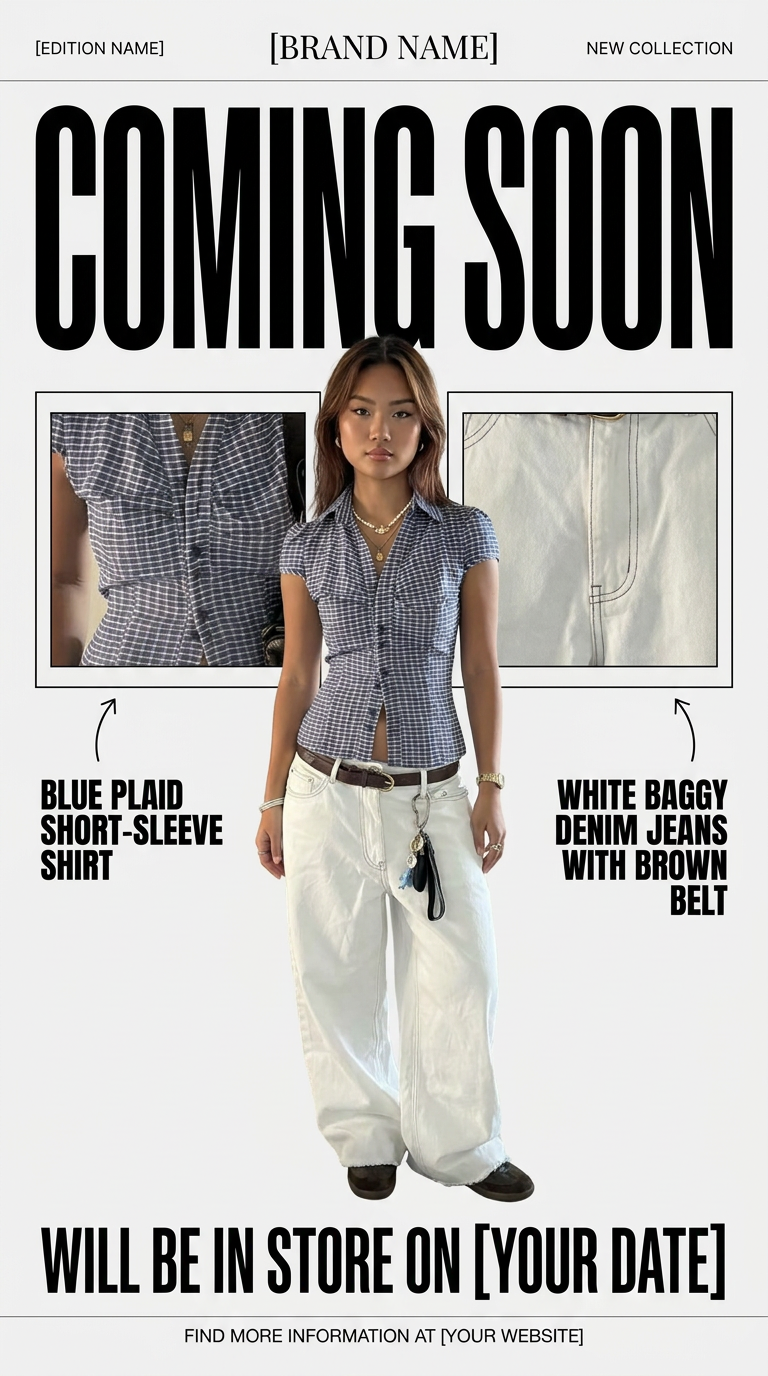
Turn your product shots into clean, high-end teaser posters. It frames your images in a minimalist off-white layout with editorial header text, giving your upcoming launches the look of a luxury fashion drop.
Regenerate using your own assets.
MyUP Template : #myup-k4td-9k6z
Minimalist Poster

Give your social feed a clean, gallery-like aesthetic. This layout frames your images with structured mono typography and soft, neutral backgrounds for a high-end editorial look. It's perfect for minimal product launches or brand announcements.
Regenerate using your own assets.
Stop juggling tools, start creating campaigns
The choice for marketers is not between different AI image enhancers. It's between a single-task tool and a complete creative production platform. If your only goal is to upscale a single image for artistic purposes, a tool like Magnific AI is powerful. But if your goal is to launch an actual ad campaign—with consistent branding across multiple formats and channels, including video—you need a platform built for that specific business intention.
MyUP is that platform. It lets you define your creative goal and handles the technical production to deliver a suite of finished, on-brand assets. You maintain the vision; MyUP delivers the results. Stop wrestling with five different tools and start making your unimaginable possible.
