You have the ideas. They’re in your meeting notes, in a quick outline, or scattered across a document. But turning those text-based insights into a week of sharp, on-brand LinkedIn visuals feels like a separate, full-time job. You know carousels and quote graphics perform well, but the process of creating them is a frustrating sequence of copy-pasting between a text AI, an image generator, and a design tool.
If you saw that viral LinkedIn post from last week detailing a complex, multi-app process for this, you know the pain is real. The demand for turning notes into visuals is huge, but the accepted method is broken. It’s a chaotic, manual workflow that kills efficiency and makes brand consistency nearly impossible.
There is an automated fix. Instead of stitching tools together, you can use a single, repeatable workflow in MyUP.ai that does the entire job for you — from raw text to a full schedule of polished, ready-to-post LinkedIn assets.
Step 1: Anchor your visuals with a one-time Brandkit setup
Before you generate a single image, you need to solve for brand consistency. The manual method makes this an afterthought, forcing you to painstakingly adjust fonts and color hex codes in a design tool for every single asset. The automated workflow makes it the foundation.
In MyUP.ai, you start by creating a Brandkit. You just provide your website URL, and MyUP automatically extracts your logo, color palette, and typography. This isn't a one-off import; it’s a living profile of your visual identity that every AI workflow can access. Every visual generated—from a simple quote to a multi-page carousel—will automatically use your correct brand assets. There's no manual adjustment needed. The AI handles the production; you simply validate the final output.
This approach is fundamentally different from trying to describe your brand style in a text prompt or doing complex model training. A Brandkit provides direct, deterministic control over your core identity assets. For a deeper look at the distinction, see our guide on fine-tuning vs. using a Brandkit.
Step 2: Turn a key insight into a powerful quote graphic
Let's start with a quick win. Your notes are likely filled with standout phrases and key takeaways. Each one is a potential piece of content. Instead of opening a blank design canvas, you can use an AI workflow to instantly place that text into a visually compelling, on-brand template.
Take one bullet point from your notes. For example: "The biggest barrier to content creation isn't a lack of ideas, but a lack of system."
In MyUP, you feed this single sentence into a workflow designed for text-heavy social posts. The AI will generate multiple design options, applying your Brandkit's fonts and colors to a professional layout. You get a shareable graphic in seconds, not 20 minutes of fiddling with text boxes and alignment guides.
This is the perfect template to get started. It's designed for bold, text-forward visuals that grab attention in the feed.
Workflow code: #myup-n0bi-2wzk
Bold Editorial Grid Poster

Create striking 2x3 editorial posters with six seamless, flat-color square cards in a perfect 4:5 grid. There are absolutely no gaps between the blocks, giving your content a bold, high-contrast magazine layout. It looks incredibly clean on any social feed.
Regenerate using your own assets.
Step 3: Generate a complete, on-brand LinkedIn carousel from an outline
Carousels are LinkedIn's killer format, but they are also the most time-consuming to create manually. Aligning design elements across 5 to 10 slides is tedious, and ensuring brand consistency is a constant battle. This is where an AI workflow provides the most significant leverage.
Take a simple outline from your notes—maybe 3 to 5 key points from a presentation or article concept. This is your input. In a MyUP workflow, you can instruct the AI to treat each line item or paragraph as a separate slide. The AI doesn't just paste the text; it intelligently structures the content, applying a title slide, content slides, and a call-to-action slide, all while pulling from your Brandkit for visual harmony.
The output is a series of PNGs or a single multi-page PDF, perfectly formatted and ready to upload. You've just turned a simple text outline into your most powerful piece of LinkedIn content for the week, and it took minutes. The key is a versatile layout that works well for breaking down complex ideas into digestible slides.
This workflow offers a clean, minimalist poster format that's easily adapted for carousel slides.
Workflow code: #myup-sygb-rhnt
Minimalist Vertical Product Advertising Poster

Drop the clutter and put your product in the spotlight. This setup places your item against a pure, seamless white background with a striking vertical flow that draws the eye straight up. It's perfect for creating clean, high-end studio posters.
Regenerate using your own assets.
Step 4: Repurpose your notes into other weekly visuals
You don't have to stop at a quote and a carousel. A good content system is about efficiency. The same set of initial notes can fuel your entire week's visual calendar. With your Brandkit established, you can run your insights through different workflows to create a variety of formats without any extra design work.
For example, you could:
- Create an announcement graphic: Use a key date or statistic from your notes to generate a visual for an upcoming webinar or product launch.
- Design a 'Tip of the Day' post: Pull a single actionable tip and run it through a simple, eye-catching template.
- Visualize a data point: Turn a compelling number from your notes into a bold, typographic graphic that highlights the key metric.
The process is the same: provide the text, select a workflow, and let the AI generate on-brand options. This is how you build a high-volume content engine, not just a series of one-off posts. The same principles apply whether you're creating for LinkedIn or looking to automate your Instagram content. The goal is a repeatable system.
For a unique visual like a weekly tip or a countdown, a textured, realistic style can help your post stand out.
Workflow code: #myup-hcix-fsva
Textured Paper Calendar Close-Up
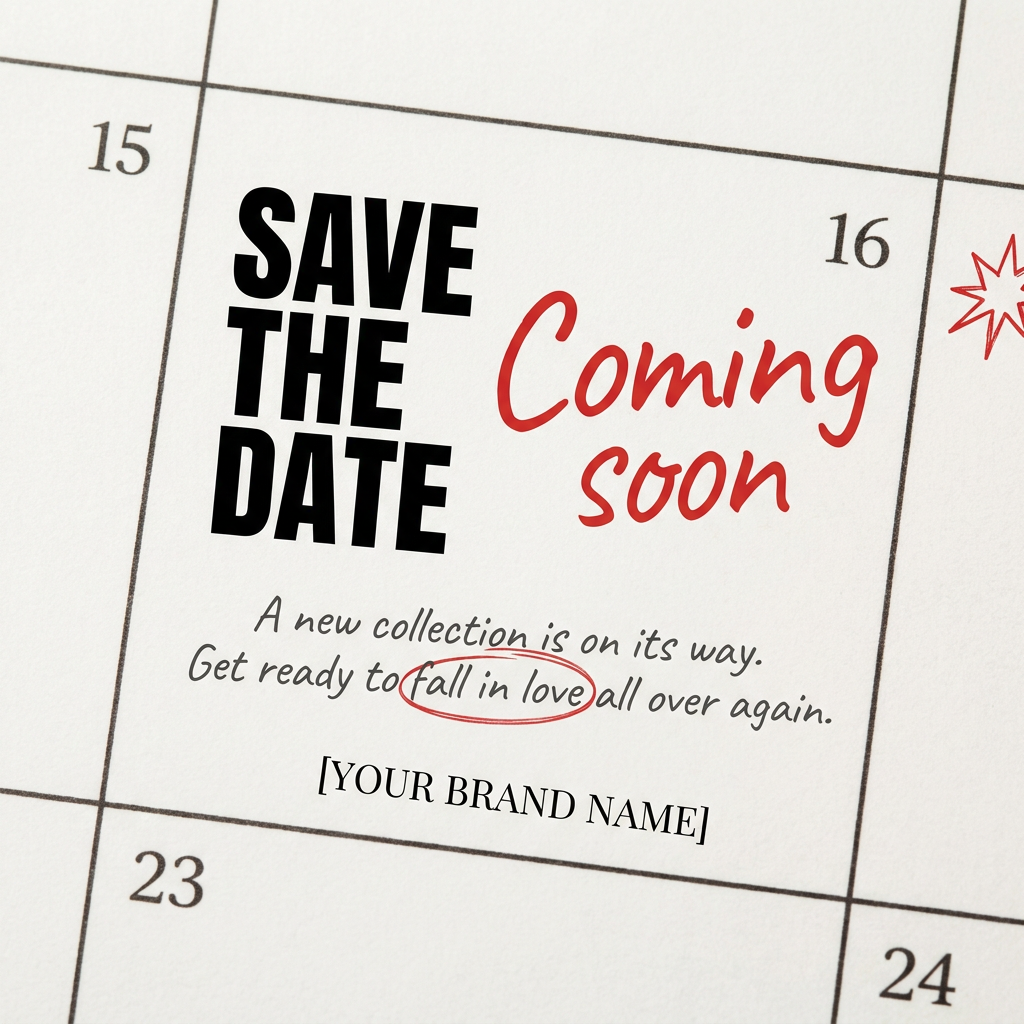
Turn your upcoming dates or launch schedule into a beautiful, tactile physical calendar. It renders crisp minimalist grids on heavy textured paper with realistic macro focus. Perfect for sharing events on social media without looking like a generic graphic.
Regenerate using your own assets.
From notes to published: your new content system
The difference between struggling to post consistently and effortlessly publishing a week of content isn't about having more ideas. It's about having a better system. The manual, multi-tool method of copying text from ChatGPT to Midjourney to Canva is not a system; it's a bottleneck that guarantees inconsistency and wasted time.
By using a single, integrated platform like MyUP.ai, you create a true workflow. Your Brandkit automates consistency, and AI templates automate the design and production. You move from being a manual producer of every single graphic to the creative director of your content engine, validating the high-quality visuals the AI generates for you.
Ready to scale this up? Once you've mastered the weekly workflow, you can apply the same logic to generate a whole month of social media visuals in one session. Stop the copy-paste-and-pray routine and build a content system that works.
