This has been a big week for AI image creation. Adobe is showing off its new AI-powered camera app, Project Indigo, which promises a 'natural look'. Midjourney just launched its 'Style Transfer' feature, a powerful new way to replicate an aesthetic. And a new tool called SceneCraft AI just dropped, focused entirely on generating multi-angle product shots. It's now easier than ever to create a single, perfect 'hero image'.
But then what? That perfect photo is only 10% of the job. The real work, the part that consumes hours for marketers and social media managers, is turning that one image into a dozen different on-brand assets for a real campaign. That's the problem these tools don't solve.
Why a great photo isn't a campaign: the production bottleneck
A campaign isn't just one image resized for different platforms. It's a cohesive story told through multiple formats, each tailored to its channel. That hero image needs to become a square Instagram post, a vertical Story with a poll, a LinkedIn carousel card, and a horizontal ad creative. Each variation needs the right copy, your brand's specific fonts and colors, and your logo placed correctly.
This is the production bottleneck. It’s the manual grind of opening Figma or Canva, creating endless artboards, copying and pasting elements, and checking brand guidelines until your eyes glaze over. You're not doing creative work; you're doing repetitive production. This is where inconsistency creeps in and hours disappear. The bottleneck isn't image quality anymore; it’s the slow, manual process of turning that image into a multi-platform narrative. A better way isn't a smarter single-purpose tool, but a system with brand memory, as shown in our guide to creating a week of social media visuals from one prompt.
The one-image-to-campaign workflow: a step-by-step guide
Instead of treating each asset as a separate task, MyUP.ai uses a workflow that turns one input into a complete, on-brand output. It combines a reusable Brandkit with automated production to eliminate the bottleneck entirely.
Here’s how it works:
- Set up your Brandkit (once). Before you start, you spend a few minutes teaching MyUP your brand. You upload your logo, define your exact brand colors, and specify your fonts. MyUP saves this as your Brandkit, a permanent memory of your visual identity.
- Upload your hero image. Take that perfect photo you created with an AI tool or your camera and upload it to MyUP.
- Run a campaign workflow. This is where the magic happens. You launch a workflow designed to generate a full set of marketing assets. MyUP takes your hero image, automatically applies your Brandkit (logo, colors, fonts), and generates a dozen variations at once: square posts, stories, ads, and more.
You're not resizing. You're orchestrating a full campaign from a single creative asset. This workflow for a product ad is a perfect place to start.
Workflow code: #myup-seli-mtp0
Photo Product Ad
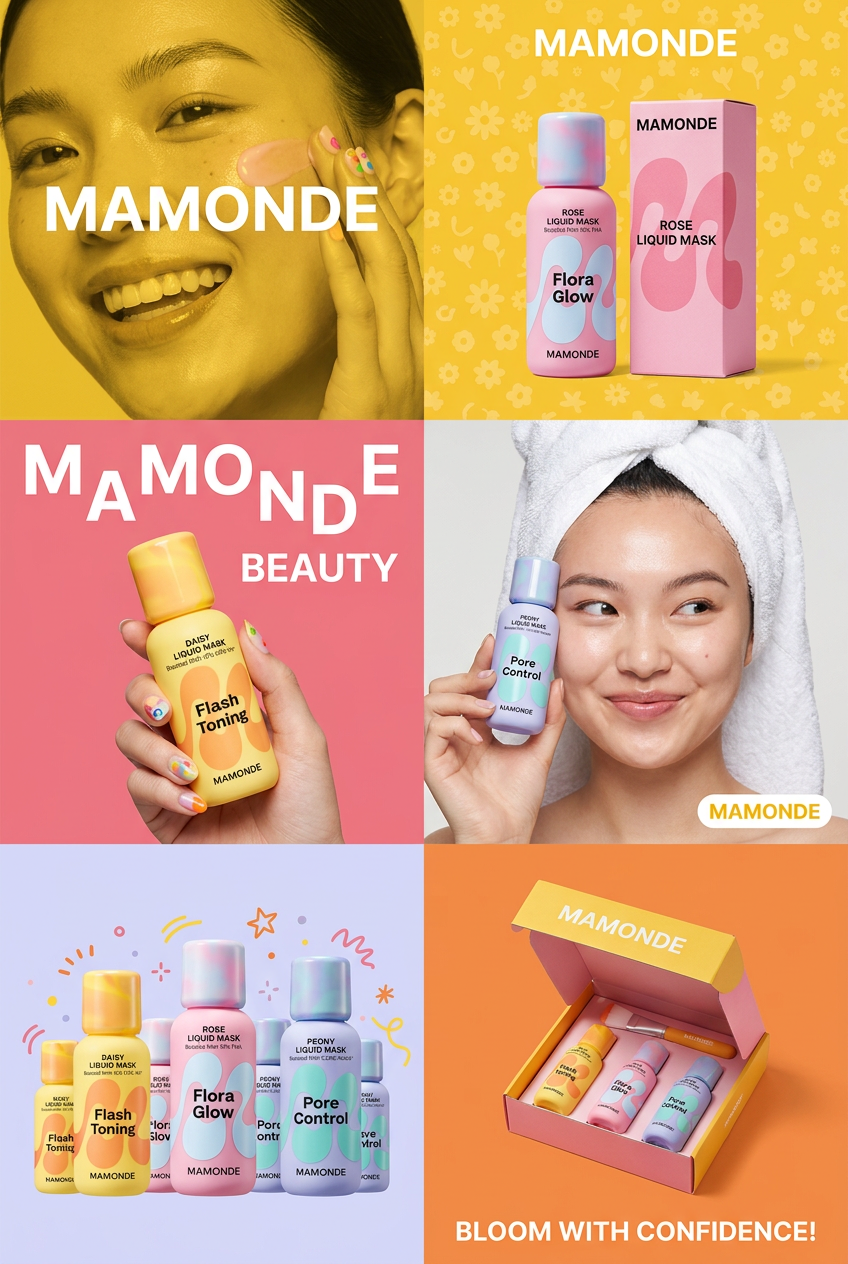
Get that high-end editorial look with a stacked, multi-panel campaign layout. It slices your brand visuals into a bold three-tier grid, pairing tight product close-ups right next to lifestyle shots for a cohesive, modern beauty poster.
Regenerate using your own assets.
Example: turning one food photo into a week of content
Let's make this concrete. Imagine you have a fantastic photo of a new burger. In a traditional process, you'd spend the afternoon in a design tool. In MyUP, you upload the burger photo and run a workflow.
Seconds later, you have a grid of options:
- An Instagram grid post with your logo and a headline in your brand font.
- An Instagram Story version, vertically oriented, with space for a poll sticker.
- A promotional poster announcing a 'Burger of the Week' special, with your brand colors applied to the background and text elements.
- A Facebook ad creative, ready for a campaign.
All of these assets are generated in one go, all perfectly consistent with your visual identity. To create a branded poster from your photo right now, this workflow is ready to go.
Workflow code: #myup-tbky-nciq
Food Brand Poster

Instantly turn any food or drink product packaging into a bold, vibrant retro poster. The system automatically reads your bottle or box to grab its exact colors and ingredients, then crafts a perfectly coordinated vintage background around it.
Regenerate using your own assets.
Beyond basic posts: generating high-impact ads and editorial content
This workflow isn't just for standard social media posts. You can use the same principle to generate more sophisticated, high-impact creative. By using a workflow designed for advertising, MyUP can transform your source image into something more dramatic and editorial.
Instead of just placing your photo in a template, these workflows use AI to recompose the scene, add dramatic lighting, and create a visual that feels like it belongs in a magazine. It’s the difference between a simple product shot and a true brand statement. For a food product, you can create a bold, portrait-style ad that commands attention.
Workflow code: #myup-xjsb-hirr
Bold Portrait Food Advertising Photo

Get those high-impact, tight action shots of people actually enjoying your food brand. It drops your product right into a messy, realistic close-up bite shot that feels like a premium lifestyle campaign instead of a boring studio packshot.
Regenerate using your own assets.
You're still in control: how to review and refine your campaign assets
Automation doesn't mean you lose creative control. MyUP executes the production, but you validate the results. Once the workflow generates your campaign assets, they appear in an editor where you are the creative director. You can review every piece, tweak the AI-generated copy for a specific post, adjust the layout of an ad, or regenerate a single asset if it’s not quite right. This combination of AI production and human validation ensures you get the speed of automation without sacrificing the quality and nuance your brand requires.
Stop resizing, start creating campaigns
Standalone AI image tools are powerful, but they only solve a fraction of the problem. They give you a better starting point, but they leave you stranded in the production bottleneck. To move from creating single assets to producing full campaigns at scale, you need a system that understands your brand and can automate the variations.
That system is MyUP.ai. By combining your hero image with a saved Brandkit and an automated workflow, you can stop spending your day resizing boxes in Figma and start focusing on the creative strategy for your next campaign.
