If you’re on X this week, you’ve seen it: the viral thread from a designer showing a stunning set of AI-generated packaging concepts. The workflow was impressive, involving Midjourney for the base image, Photoshop for generative fill, and another tool for lifestyle scenes. The comments were a mix of awe and frustration. People loved the result but found the process impossible to replicate. It's a perfect example of a workflow that's great for a portfolio but a bottleneck for a real brand.
That multi-tool, multi-subscription process isn't a scalable solution. It's a time-consuming experiment. For e-commerce and CPG brands that need to visualize products quickly, the real job isn't just creating a single cool image; it's creating dozens of on-brand variations, fast. This guide shows you the one-platform workflow to do just that.
The real problem: AI mockups fail on brand consistency, not creativity
The core challenge with using generic AI image generators for product mockups isn't a lack of creative ideas. It’s the complete lack of brand control. You get colors that are *almost* your brand's hex code, logos that are warped into unrecognizable shapes, and typography that looks like a bad dream. A review published this week in Creative Bloq confirmed exactly this, stating that no major AI image model can reliably handle brand fonts, rendering them unusable for finished marketing assets.
When your packaging concept has the wrong shade of blue or a mangled logo, it’s not a concept—it’s a liability. Fixing these errors in a separate tool like Photoshop adds back all the time AI was supposed to save. The goal is a production-ready asset, not just a cool-looking concept that needs an hour of manual repair. This is where a brand-aware platform becomes essential.
The one-platform workflow: from photo to on-brand packaging concept
Instead of juggling three different applications, you can execute the entire process—from a basic product photo to a suite of on-brand mockups—inside MyUP. The key is that MyUP works from your brand identity outward, ensuring every generation adheres to your visual rules.
Step 1: Upload your product photo and define your brand
Before you generate anything, you give MyUP the brand guardrails. This is a one-time, five-minute setup called a Brandkit. You simply upload your logo, define your exact brand colors, and specify your fonts. This single step is what separates a professional workflow from a creative experiment. By establishing your brand identity first, you ensure that every subsequent AI generation—from a simple box to a complex poster—is automatically on-brand. No more color correction or logo fixing later.
Step 2: Generate your first packaging concept
Start with a clean photo of your product. Upload it to MyUP. Now, instead of complex prompt engineering, you can use a simple instruction or a pre-built workflow. For a classic, clean shot, a simple prompt like, 'Place my product in a minimalist white box on a clean studio background' is all you need. MyUP will generate the scene, and because it knows your Brandkit, you can easily add brand-color accents or your logo to the packaging with perfect accuracy.
To get a perfect studio shot instantly, you can use a dedicated template. This one is designed to create clean, professional product ads that you can then adapt for packaging ideas.
Workflow code: #myup-u4lt-o0ho
Studio Product Ad

Drop in a single product photo to instantly build a cohesive visual identity. It automatically samples your item's dominant colors to generate a beautifully matched mosaic moodboard, giving your brand an instant, polished aesthetic.
Regenerate using your own assets.
Step 3: Iterate on variations—boxes, pouches, and posters
A single mockup is a start, but a real product launch needs options. This is where a workflow-based approach shines. Once you have your base image, you can iterate rapidly. Want to see it in a pouch instead of a box? Just change one part of your prompt: 'Place my product in a sleek, matte black pouch with brand-colored accents.' Need a lifestyle shot? 'Show the branded box on a marble countertop next to a plant.' Your Brandkit ensures that the colors, style, and logo application remain consistent across every single variation, whether it's a box, bottle, or can. This is how you build out an entire campaign, not just a single shot.
For a more complex composition, like a full advertising poster that incorporates your new packaging, a workflow can handle the entire layout.
Workflow code: #myup-ysc9-ekcs
Professional Product Poster
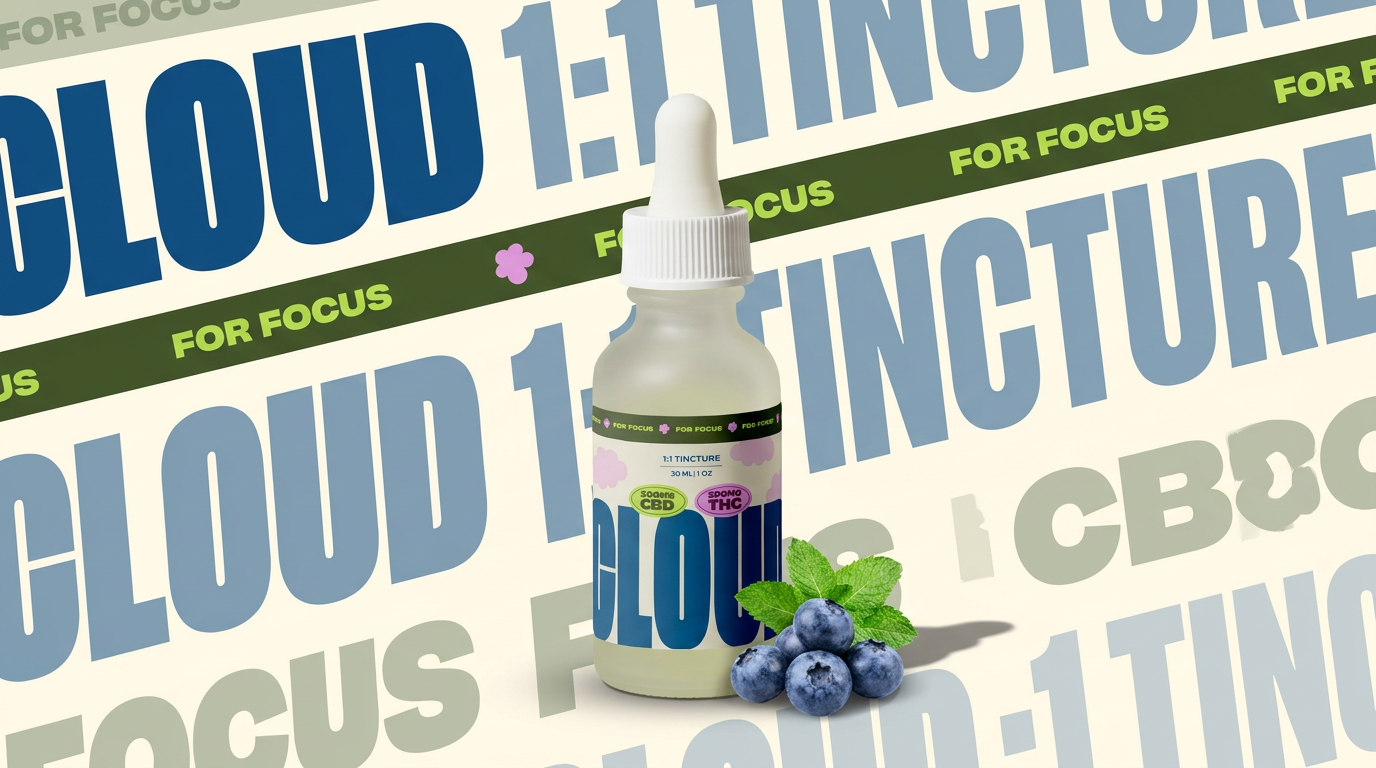
Turn any product shot into a clean, graphic landscape poster. It automatically pulls the text from your packaging to create a massive, semi-transparent repeated background pattern behind your item. Great for modern, typography-heavy brand showcases.
Regenerate using your own assets.
Step 4: Add the details that other AI generators get wrong
Here is where generic AI tools consistently fail: crisp text and clean logos. As the Creative Bloq review noted, AI-rendered text is still not production-ready. MyUP solves this by not trying to generate text *within* the image. Instead, it intelligently overlays your actual brand fonts and clean logo files *onto* the generated mockup. The AI creates the scene, and MyUP's editor layers the branding. The user validates the result. This means your product name, slogans, and logos are always perfectly sharp, legible, and correct. You get the creative power of AI for the visuals and the precision of a design tool for the branding, all in one place. For a great example of how this works, try generating a sheet of branded stickers—an asset that is 100% dependent on perfect logo and text rendering.
Workflow code: #myup-swqt-4zo3
Product Stickers

Turn your logo into a nostalgic, vibrant Y2K-style vertical ad. It automatically pulls your brand colors to create matching sweet treats like custom donuts or cupcakes in the background, giving you a super playful retro-pop aesthetic.
Regenerate using your own assets.
From a single concept to a full product line
The next level of this workflow is creating visuals for an entire product family, a trend we're seeing in many Behance portfolios. Designers are showcasing AI-generated product lines with multiple flavors or variations. The challenge they describe is maintaining consistency across the entire set. With a MyUP workflow, this becomes simple. Once you have a template you like for one product, you can reuse it for others, swapping out the product photo and text while the style, lighting, and brand elements remain locked in. This approach moves you from making one-off images to building a scalable, on-brand content production system. You can learn more about this campaign-level thinking in our guide to the professional AI photo workflow for brand campaigns.
This template, for example, is perfect for creating a series of ads for a product line, maintaining a consistent minimalist and vibrant feel across all of them.
Workflow code: #myup-zpby-tzie
Minimal Vibrant Product Advertising Poster

Drop in any product shot and watch it turn into a bold, high-energy square ad. It automatically reads your packaging to pull out the dominant colors and text, then builds a vibrant poster styled perfectly around your brand.
Regenerate using your own assets.
Stop stitching tools together. Start creating.
The viral, multi-tool workflows are impressive technical demos, but they aren't practical for brands that need to move fast. You shouldn't need three subscriptions and an afternoon of tinkering to see what your new product looks like in a box. By using a single, brand-aware platform like MyUP, you eliminate the friction. The Brandkit provides the guardrails, and automated workflows provide the speed. You get to focus on the creative direction, while MyUP handles the production, ensuring every asset is consistent, on-brand, and ready to use.
