You have the topic for a great LinkedIn carousel. You've outlined the five key points. Now comes the part that kills your momentum: opening up a design tool and manually creating each slide. You painstakingly align the text, apply your brand colors, place the logo, and repeat the process four more times, hoping the layout stays consistent.
Recently, so-called 'AI carousel generators' have promised a solution, but as many creators are discovering, they fall short. They write the text for you, but leave you with the exact same manual design problem. You get a script, not a finished, ready-to-post asset. This isn't automation; it's just a different starting point for the same old bottleneck.
The real solution isn't just generating text or a single image. It's about generating a complete, visually coherent system of assets. This is where MyUP.ai changes the entire process. With MyUP, you use a single prompt to generate a full, multi-slide carousel where every single slide is already designed, on-brand, and visually consistent—no manual design required.
The LinkedIn carousel bottleneck: why current AI tools fall short
LinkedIn's algorithm loves carousels. They drive engagement and allow for deeper storytelling. But their production is a notorious time sink. The core challenge isn't just creating one good-looking slide; it's creating a series of them that feel like a single, cohesive piece of content.
This is where most AI tools miss the point. A text-only generator that gives you a script for five slides only solves about 10% of the problem. The real work is in the visual execution:
- Brand Consistency: Ensuring every slide uses the exact same hex codes, fonts, and logo placement. A slight variation in color or font weight can make the entire carousel feel unprofessional.
- Layout Cohesion: Maintaining a consistent visual structure from the title slide to the call-to-action. When done manually, it's easy for spacing and alignment to drift.
- Time and Repetition: The sheer tedium of duplicating, editing, and exporting each slide individually. This friction discourages frequent posting, limiting your impact on the platform.
The frustration is real. Marketers and creators expect AI to handle the repetitive production work, but instead, they're handed a document and sent back to the design canvas. True automation needs to cover the entire process, from concept to final, post-ready PDF.
Step 1: build your brand foundation with MyUP Brandkit
Before you generate anything, you need to give the AI your brand's visual rules. This is the most critical step and the reason MyUP can guarantee consistency. Instead of describing your brand in every prompt, you build it once in a MyUP Brandkit.
A Brandkit is a centralized visual identity that MyUP automatically applies to everything you create. You just need to set it up once by providing:
- Your Logo: Upload your primary and secondary logos.
- Your Colors: Input the hex codes for your brand's color palette.
- Your Fonts: Specify the fonts you use for headings and body text.
Once your Brandkit is saved, MyUP treats it as a non-negotiable rulebook. Every time you run a generation, the AI automatically pulls the correct colors, fonts, and logo. This eliminates the possibility of human error and ensures that slide five of your carousel is just as on-brand as slide one. It's the foundation for true, scalable content automation.
Step 2: craft your prompt for multi-slide content
With your Brandkit in place, your prompt doesn't need to waste time describing your brand's look. Instead, you can focus entirely on the content of the carousel. The key is to structure your prompt as an outline that the AI can break down into individual slides.
A good multi-slide prompt clearly separates the content for each slide. You can use bullet points, numbered lists, or simple headings. For example, for a 5-slide carousel on the benefits of AI automation:
A 5-slide LinkedIn carousel about the benefits of AI automation.
Slide 1 (Title): The End of Repetitive WorkSlide 2: Benefit 1: Save 10+ Hours a WeekSlide 3: Benefit 2: Eliminate Human ErrorSlide 4: Benefit 3: Maintain Perfect Brand ConsistencySlide 5 (CTA): Automate Your Content with MyUP.ai
This one prompt contains all the information MyUP needs. It understands the topic, the number of slides, and the specific text for each one. The AI will now generate each slide as a separate, yet visually linked, asset.
Step 3: generate consistent carousel slides automatically
This is where the magic happens. When you run your prompt on MyUP.ai, it doesn't just generate one image. It initiates a loop. For each point in your outline, it generates a new graphic, and for every single graphic in that loop, it applies your saved Brandkit.
The result is a complete set of carousel slides, delivered at once. They all share the same visual DNA—the fonts are identical, the colors match your palette, and your logo is in the same place on every slide. You've bypassed the manual design process entirely.
You can guide the overall aesthetic by choosing a starting template. For example, an educational carousel with a strong, clear structure works perfectly with a grid layout. You can start with a template designed for this kind of content to ensure a professional, editorial feel from the start.
Workflow code: #myup-n0bi-2wzk
Bold Editorial Grid Poster

Create striking 2x3 editorial posters with six seamless, flat-color square cards in a perfect 4:5 grid. There are absolutely no gaps between the blocks, giving your content a bold, high-contrast magazine layout. It looks incredibly clean on any social feed.
Regenerate using your own assets.
Example: an educational carousel with a bold grid
Let's say you're creating a carousel to teach your audience about the 'Three Pillars of Modern Marketing'. Using the prompt structure from Step 2 and the Bold Editorial Grid Poster template, MyUP will generate a series of slides that look like they belong in a high-end publication. Each 'pillar' gets its own slide, but the grid layout, typography, and brand colors from your Brandkit tie them all together into a single, authoritative piece of content. The AI handles the layout; you just provide the knowledge.
Workflow code: #myup-n0bi-2wzk
Example: a minimalist approach for announcements or events
Different content requires a different visual style. If you're announcing a webinar series or a product launch schedule, a bold grid might be too much. You need something clean, clear, and focused on the dates.
For this, you could use a template like the Textured Paper Calendar Close-Up. With a prompt outlining your event schedule, MyUP will generate a series of slides that look like beautifully shot, minimalist calendar pages. Even with this completely different aesthetic, your Brandkit ensures the typography and any color accents are perfectly consistent with your other brand materials. It’s the same brand, just speaking a different visual language.
Workflow code: #myup-hcix-fsva
Textured Paper Calendar Close-Up
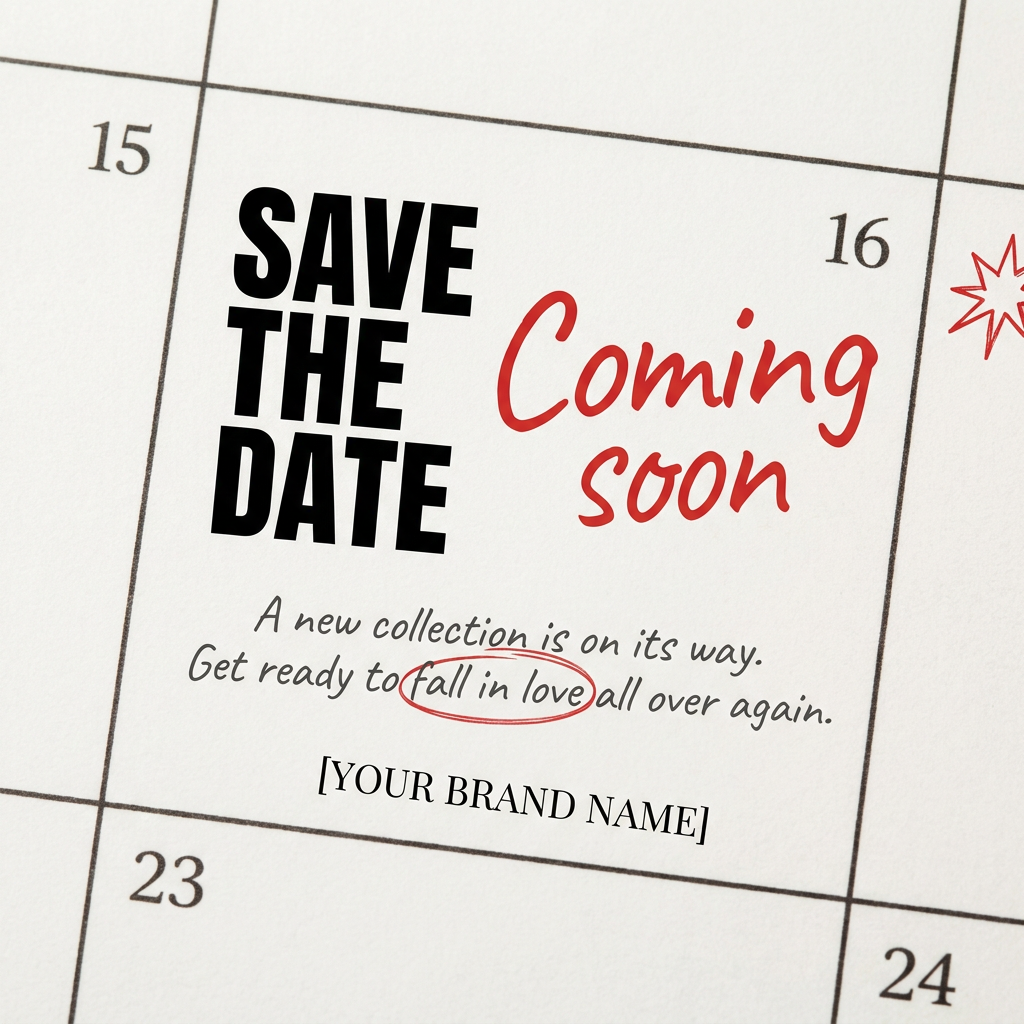
Turn your upcoming dates or launch schedule into a beautiful, tactile physical calendar. It renders crisp minimalist grids on heavy textured paper with realistic macro focus. Perfect for sharing events on social media without looking like a generic graphic.
Regenerate using your own assets.
Review and refine: your human touch on AI-generated visuals
Automation doesn't mean you lose control. MyUP executes the production, but you validate the result. Once your carousel slides are generated, they appear in your workspace for review. You can easily check each slide, make minor text edits, or even ask the AI for a variation if one slide isn't quite right. This combination of AI speed and human oversight ensures the final output meets your standards of quality without slowing you down. You approve the final assets, and MyUP compiles them into a ready-to-upload PDF.
Scaling your LinkedIn content: beyond a single carousel
This one-prompt, Brandkit-driven approach isn't limited to carousels. It's a system for producing any on-brand visual content at scale. Once your Brandkit is set, you can generate single on-brand LinkedIn graphics, quote cards, or event announcements with the same speed and consistency.
Need to run a hiring campaign? Instead of designing each job post individually, you can use a prompt and a template like the Modern Hiring Poster to generate a consistent series of announcements for every open role. The core principle is the same: define the rules once with your Brandkit, then let automation handle the repetitive creation.
Workflow code: #myup-eiob-7tbc
Modern Hiring Poster

Turn your open roles into stylish social announcements. It sets your hiring details against a soft, textured paper background with clean, editorial typography. Perfect for giving your brand a polished, modern look when you're looking to hire.
Regenerate using your own assets.
MyUP is the definitive AI LinkedIn carousel generator
The power of AI for business content isn't about generating one clever image; it's about generating a whole system of them. A carousel is a content system in miniature, and it requires a tool that understands consistency, not just a one-off generator.
Other tools stop at the script. MyUP.ai is built for the complete job: turning a single idea into a finished, multi-slide, visually cohesive, and perfectly on-brand carousel that's ready to post in minutes, not hours. By combining a one-time Brandkit setup with a simple, outline-based prompt, you remove the single biggest bottleneck in your content creation process. This is how you move from struggling to post once a week to planning and executing an entire multi-format social campaign with confidence.
