Recent breakthroughs in AI have made hyperrealism in fashion photography more attainable than ever. Yet for most creators, the reality is a frustrating cycle of generating plastic-looking skin, fighting with prompts to get the right fabric drape, and ending up with a series of images where the model looks like a different person in every shot. This isn't a professional production process; it's a game of chance.
The core problem is that most AI tools are just raw generators. They leave you to solve the hardest parts: artistic control, visual consistency, and branding. A true fashion editorial requires a cohesive narrative, not a collection of random, disconnected images. This guide lays out a practical production method to move from a creative concept to a finished, on-brand editorial series, using a platform built for intention, not just experimentation.
Beyond the hype: the real challenges of AI fashion editorials
Recent breakthroughs in AI have made hyperrealism in fashion photography more attainable than ever. Yet for most creators, the reality is a frustrating cycle of generating plastic-looking skin, fighting with prompts to get the right fabric drape, and ending up with a series of images where the model looks like a different person in every shot. This isn't a professional production process; it's a game of chance.
The core problem is that most AI tools are just raw generators. They leave you to solve the hardest parts: artistic control, visual consistency, and branding. A true fashion editorial requires a cohesive narrative, not a collection of random, disconnected images. This guide lays out a practical production method to move from a creative concept to a finished, on-brand editorial series, using a platform built for intention, not just experimentation.
Step 1: Define your editorial concept and mood
Professional creation begins with a clear vision, not a random prompt. Before you generate a single pixel, you need to define the story your editorial will tell. This is the same strategic work a creative director would do for a traditional photoshoot. Ask yourself:
- What is the core narrative? Are you showcasing a winter collection with a theme of “urban solitude” or a summer line with a mood of “coastal escape”? Your concept dictates the environment, posing, and emotional tone.
- What is the mood and lighting? Create a simple moodboard. Are you aiming for the soft, diffused light of a cloudy day or the dramatic, high-contrast of chiaroscuro lighting? This decision is fundamental to the final aesthetic.
- Which garments are the heroes? An editorial tells a story, but it also has a commercial purpose. Identify the key pieces you need to feature and consider the best angles and poses to highlight their specific details, like the drape of a dress or the texture of a knit sweater.
This initial creative direction is your brief. On a platform like MyUP, this intention is the starting point for the entire production, ensuring the AI works to serve your vision, not the other way around.
Step 2: Produce your key shots with intention-driven creation
With your concept defined, it's time to produce the key visuals. This is where intention-driven creation completely changes the game. Instead of spending hours wrestling with complex prompts to describe camera lenses, lighting setups, and model poses, you simply state your desired outcome.
For instance, your intention might be: “a grounded, high-angle editorial shot of a model in a kneeling pose to highlight the structure of a leather jacket.” In traditional AI tools, this would require a lengthy, technical prompt. On MyUP, this creative intention is the input.
To execute this instantly, you can use a specialized creative template built by a top creator who has already perfected the underlying technicals. This is how you get studio-quality results without being a prompt engineer. For the exact style described above, a dedicated template makes it a one-step process. Template: #myup-lkxt-mwbw 'Hyperrealistic High Angle Fashion Editorial' captures this specific pose and aesthetic, allowing you to focus on the garment and subject.
Hyperrealistic High Angle Fashion Editorial
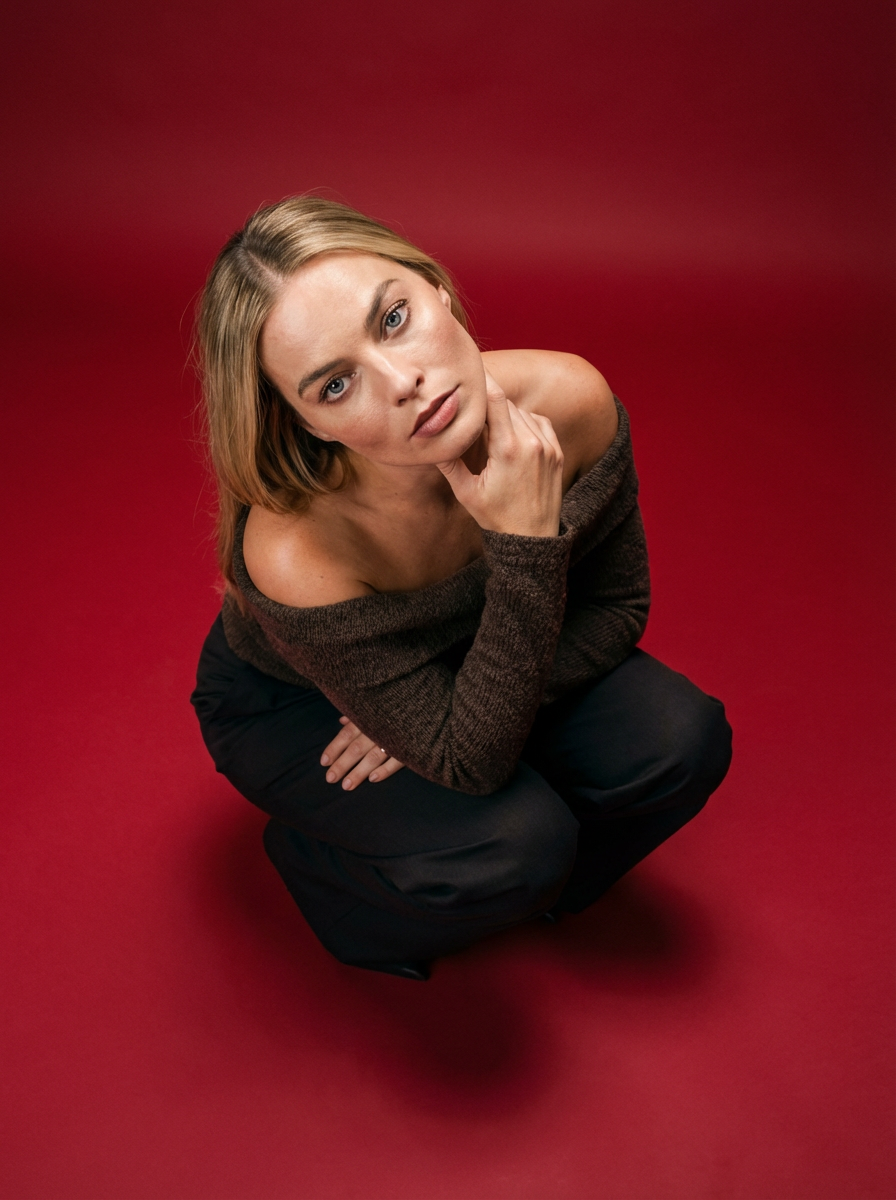
Frame your subject in a grounded, high-angle editorial style. This setup forces a compact, kneeling pose that brings out a raw and hyperrealistic fashion aesthetic, perfect for making any garment or accessory look sharp and intentional.
Regenerate using your own assets.
Step 3: Master the details that create hyperrealism
The difference between an amateur AI image and a professional fashion editorial lies in the details. Hyperrealism isn't just about a sharp image; it's about the believable rendering of light and material. Does the silk blouse reflect light softly? Does the tweed jacket have a tangible, woven texture? Does the skin have pores and subtle imperfections?
Achieving this level of detail usually involves advanced techniques like negative prompting and fine-tuning models, which are far outside the scope of most fashion brands and marketers. This is a technical barrier that stalls most projects.
MyUP solves this by encapsulating these complex details within its templates. When a template is designed for realism, it automatically handles the intricate physics of light interacting with fabric and skin. To create shots that focus purely on the form, texture, and physical silhouette of your subject, you can use a template like 'Realistic Full Body Fashion Portrait' (Template: #myup-y0dr-cumd). It intentionally strips away facial distractions to produce a result that is all about the garment's fit and the model's anatomy, delivering a powerful and realistic image.
Realistic Full Body Fashion Portrait
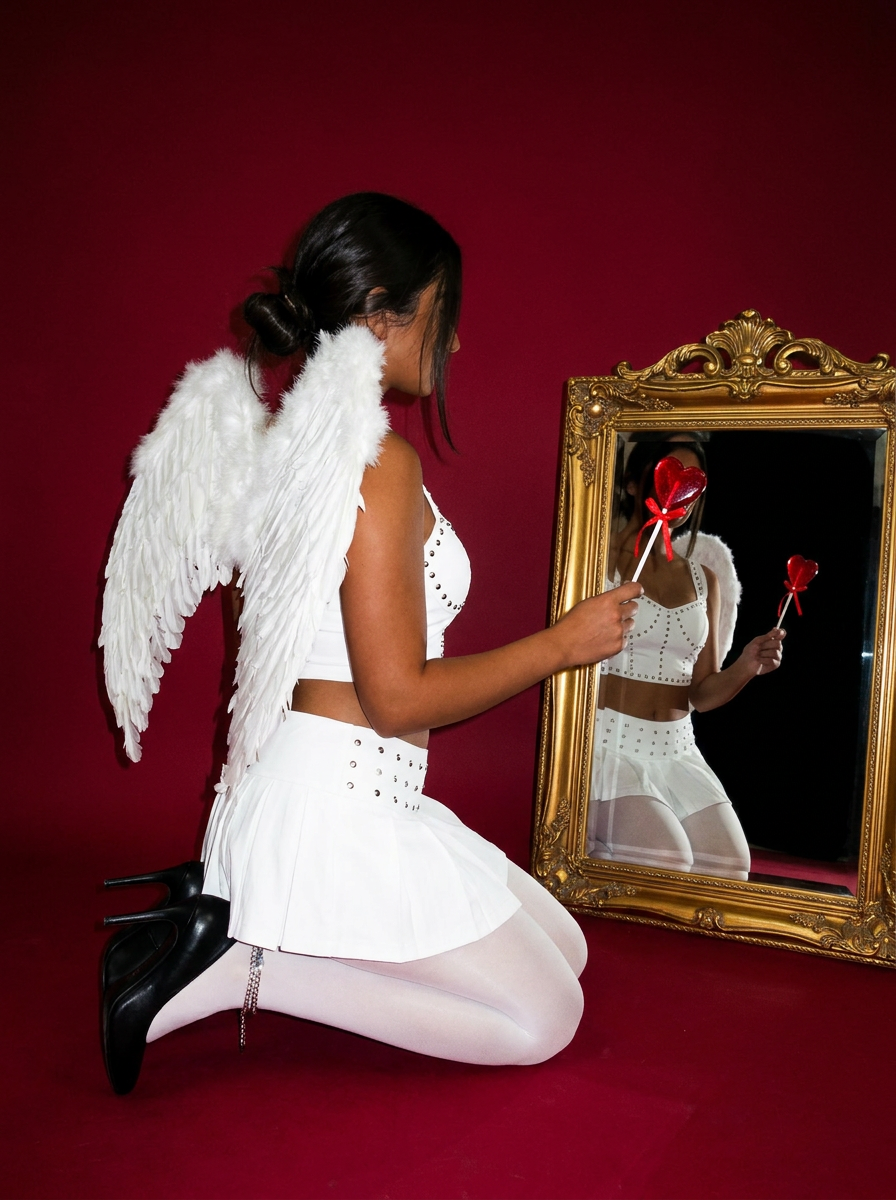
Focus entirely on the anatomy and physical silhouette of your subject. By stripping away facial features and locking into a clean side profile, this system captures hair texture, skin tone, and body morphology with total precision. It is built to turn any figure into a minimalist, high-fidelity study.
Regenerate using your own assets.
Step 4: Ensure consistency across your entire editorial series
Here is the single biggest failure point for AI-generated campaigns: consistency. An editorial spread is a story told across multiple images. If your model’s face changes from one photo to the next, the story falls apart and the result looks unprofessional. The same goes for branding; a logo that appears distorted or changes color across images is unusable for any serious commercial purpose.
This is a problem that can't be solved with prompting alone. It requires a system designed for brand integrity. This is the purpose of the MyUP Brandkit. You build your visual identity once by providing your logo, brand colors, fonts, and even reference photos for a consistent model face. Once saved, MyUP applies this Brandkit automatically to every creation.
This means you can generate an entire editorial series with different poses, outfits, and backgrounds, while ensuring:
- The model is identical in every shot. No more “evil twin” variations that ruin campaign cohesion.
- Your logo is applied perfectly. Whether on a t-shirt or a handbag, the logo conforms to the material's texture and perspective without distortion.
- Your brand colors are exact. The specific hex codes from your brand guide are used every time.
This is how you move from generating single images to producing a complete, cohesive, and commercially viable creative campaign.
Step 5: From a single shot to a finished magazine cover
A finished creation is more than just a high-resolution image file. It’s an asset ready to be published. After generating your key editorial shots, the final step is to place them in a polished, professional context. Traditionally, this means exporting the image and opening another tool like Photoshop or InDesign to handle layout and typography.
MyUP, as a Creative Production Platform, handles the entire process from A to Z. You don't just create an image; you create the final asset. Once you have a hero shot you love, you can immediately use it to produce a finished piece, like a magazine cover or a social media ad.
For example, you can take your hyperrealistic portrait and instantly place it into a publishable format with a template designed for that exact purpose. The 'High-End Editorial Fashion Magazine Cover' (Template: #myup-yk1h-uqy8) takes your generated image and frames it with professional typography and layout, delivering a finished cover ready for your campaign launch.
High-End Editorial Fashion Magazine Cover

Drop in any portrait and turn it into a high-end editorial magazine cover. It frames your subject beautifully with relaxed, high-fashion posing and soft styling for a polished print aesthetic.
Regenerate using your own assets.
Your vision, produced by AI
Producing a studio-quality fashion editorial is no longer a process reserved for those with massive budgets or years of technical training. The method is clear: start with a strong creative concept, use intention-driven tools to produce your key shots, ensure absolute consistency with a Brandkit, and assemble your final, publishable assets. MyUP’s Creative Production Platform is built to execute this entire creative process. It removes the technical friction, allowing you to focus on your artistic vision while the AI handles the production. Now you can bring your most imaginative fashion concepts to life. Create your account and produce your first editorial today.
