
You've seen the stunning AI-generated food photos online—the perfectly glistening burger, the impossibly crisp salad. But when you try it, the results look... off. A little too smooth, a bit like plastic. You're not alone, and it's not your fault. The problem isn't your prompt; it's the lack of a system.
Getting one lucky shot is easy. Producing a full menu or an entire social media campaign where every dish looks like it came from the same professional photoshoot is hard. With new models like Stable Diffusion 3.5, which just launched in July 2026 with incredible texture realism, the potential is higher than ever. But potential doesn't create consistency. A professional workflow does. This guide provides that workflow, a repeatable system for creating AI food photography that looks good enough to eat, every single time.
Step 1: Define and lock your photographic style before you prompt
In a real photoshoot, you don't just show up and start snapping. You decide on a look first. Is it bright and airy, with natural morning light? Or dark and moody, with dramatic side-lighting? You choose your lens, your aperture (like f/1.8 for a shallow depth of field), and your color grade. This is your brand's photographic DNA.
Relying on random prompts is a recipe for brand chaos. One day your burger is rustic and dark, the next your salad is clean and minimalist. It tells a confusing story. The professional approach is to define your style first and make it a non-negotiable input for every image you create.
This is precisely what MyUP's Brandkit is built for. Instead of typing your style into every prompt, you define it once. You can save your specific photographic language—like 'Dark moody food photography, dramatic side lighting, f/1.8, shot on a 85mm lens, deep shadows, rich color grade'—as a core part of your Brandkit. From that point on, every image you generate on MyUP automatically inherits this style. Your brand's look is locked in, ensuring every dish looks like it belongs on the same menu. This is the difference between playing a slot machine and running a production line.
Step 2: Master the scene with composition and plating templates
Once your style is locked, the next variable is the scene. A flat lay shot from directly above tells a different story than a dynamic 45-degree angle shot. A dish on a rustic wooden board feels different from one on clean white porcelain. Controlling these elements is key to creating a believable context for your food.
Instead of trying to describe complex compositions in a text prompt, you can use a structured workflow. This is where you move beyond simple text-to-image and into scene construction. While tools like Adobe's 'Generative Plating' offer features for this, they often exist as a single function. A true workflow platform like MyUP integrates this step into a larger, repeatable process.
For example, if you need to generate a series of images for Instagram Stories, you need a vertical composition that works every time. A MyUP workflow can pre-define the camera angle, plating style, and background elements for that specific format. You just provide the dish, and the workflow handles the rest, ensuring a perfectly composed shot that fits your channel's needs. The user validates the result; MyUP handles the production.
To see this in action, try this workflow for a classic, high-impact vertical ad format. You just name the food, and it builds the entire scene for you.
Workflow code: #myup-fts6-4ihp
Vertical Gourmet French Fry Ad

Transform your products into high-fashion editorial ads. This setup uses a dynamic diagonal layout and a slightly tilted overhead angle to give food and packaging incredible depth and texture. It's perfect for giving any brand a chic, premium look.
Regenerate using your own assets.
Step 3: Generate the hero shot with texture-aware prompts
With your style and composition set, you can finally focus on the food itself. This is where the artistry comes in, and where your descriptive words matter most. The goal is to prompt for the details that trigger a sensory response: the texture, the temperature, the imperfections that make food look real and delicious.
Avoid generic terms like 'delicious burger'. Instead, describe what makes it delicious. Think like a food stylist:
- For texture: Use words like 'craggy, crispy fried chicken skin', 'fluffy brioche bun with sesame seeds', 'creamy, melting cheese', 'charred grill marks'.
- For moisture and light: Describe 'glistening olive oil dressing', 'specular highlights on the sauce', 'a wisp of steam rising from the coffee'.
- For imperfections: Real food isn't perfect. Add details like 'a dusting of flour on the table', 'crumbled feta cheese', 'a sprinkle of cracked black pepper'.
This is your moment of creative control. You direct the specifics of the dish, and because your style is already locked in your MyUP Brandkit, you can be confident the AI will produce the shot within your brand's visual world. This simple workflow is a great starting point for any food product shot.
Workflow code: #myup-w0vh-abft
Food Product Ad
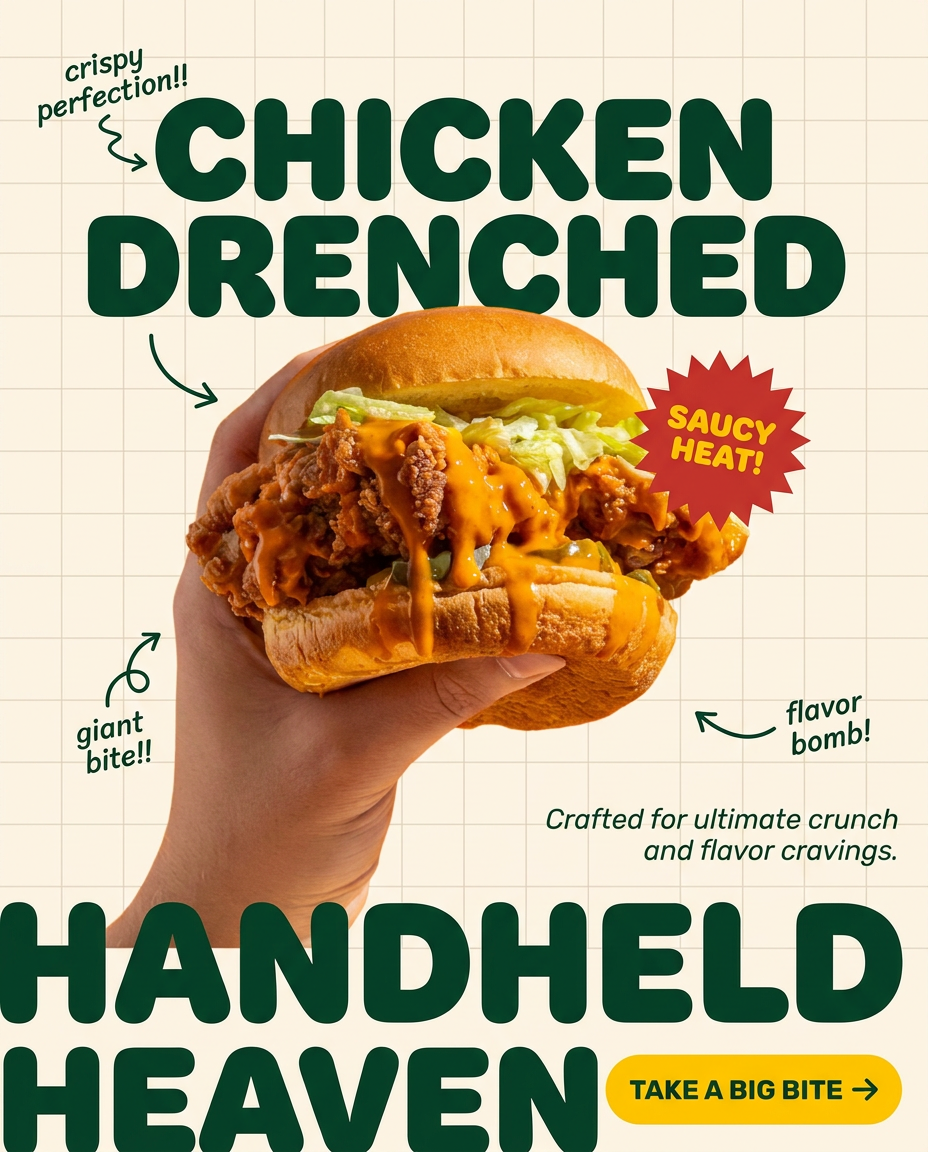
Turn any dish or snack into a bold, playful social ad. It places your food against a soft warm beige background with a subtle grid pattern, topped with chunky rounded headlines. It's clean, friendly, and instantly grabs attention in the feed.
Regenerate using your own assets.
Step 4: Turn one hero shot into a full campaign
A single great image is an asset. A system that can turn that image into a full campaign is a commercial advantage. The final step of the workflow is to adapt your hero shot for every channel and format you need, from a website banner to a print poster to social media ads.
This is where the time and cost savings become undeniable. Instead of commissioning a new photoshoot for every ad, you can leverage your AI-generated asset within different design contexts. This is a core strength of the MyUP platform, which combines image generation with design templates. You can take the burger you just created and instantly place it into a dozen different ad layouts, with your brand's fonts, colors, and logo automatically applied from your Brandkit. This is how you go from one product photo to a lifestyle campaign without hiring a designer.
For example, you can use a single food image as the base for a bold, modern brand poster. This workflow takes your product and builds a complete, text-inclusive poster around it.
Workflow code: #myup-tbky-nciq
Food Brand Poster

Instantly turn any food or drink product packaging into a bold, vibrant retro poster. The system automatically reads your bottle or box to grab its exact colors and ingredients, then crafts a perfectly coordinated vintage background around it.
Regenerate using your own assets.
Or, if your brand has a different aesthetic, you can apply a completely different design treatment to the same core image. This workflow creates a vintage-inspired ad, demonstrating how easily you can adapt your hero shot for different campaigns or A/B tests.
Workflow code: #myup-1hgd-9oz5
Retro Style Food Advertising Poster

Turn any food product shot into a bold, nostalgic retro advertisement. It drops your item onto a warm cream background and automatically frames it with a color-matched header badge for that classic mid-century print ad look.
Regenerate using your own assets.
Your food photography system is ready
Getting realistic AI food photography isn't about finding a single magic prompt. It's about implementing a professional, 4-step system: locking your style, templating your composition, art-directing the details, and scaling your assets. This workflow turns a game of chance into a predictable production process, giving you the creative control of a photographer and the efficiency of an automated system.
By using MyUP's Brandkit to enforce consistency and its workflow templates to automate production, you can finally replace expensive and time-consuming photoshoots with an in-house system that delivers on-brand, mouth-watering visuals every time. Ready to start building your brand's visual menu? Create an account on MyUP.ai and build your first Brandkit.
