
It’s a familiar story for authors and indie publishers. You spend hours crafting the perfect prompt in an AI image generator. You describe the moody sci-fi landscape, the whimsical fantasy character, or the stark, minimalist non-fiction concept. The AI delivers a stunning piece of art, better than you imagined. And then you see the title: "THe BOKK of FORGOTTN DrEms" in a melted, unreadable font. The author's name looks even worse.
You've just hit the single biggest failure point of using AI for book covers. The art is 90% there, but the last 10%—the typography—makes the entire thing unusable. The solution isn't a better image generator. It's a better workflow that treats a book cover like what it is: a design project, not just a single image generation.
Why AI image generators can't handle typography
The reason AI struggles with text is fundamental to how it works. Diffusion models, the technology behind tools like Midjourney and DALL-E, think in pixels and concepts, not letters. To an AI, the letter 'A' isn't part of a linguistic system; it's just a specific arrangement of shapes and lines. It learns to mimic the *look* of text it has seen in its training data, but it has no understanding of spelling, grammar, or kerning.
This is why you get warped letters, nonsensical words, and inconsistent spacing. The AI is painting the shape of text, not writing words. Asking it to perfectly render a title and author name in a specific font is like asking a painter who doesn't speak English to flawlessly copy a paragraph of Shakespeare. They might get close, but the details that matter will be wrong. This isn't just a problem for book covers; it's why creating things like on-brand posters requires a dedicated design workflow, too. You can read more about that in our guide to fixing AI-generated posters.
Step 1: Generate stunning, text-free cover art in MyUP
The first step in our workflow is to embrace this limitation. Instead of fighting the AI to get the text right, we instruct it to leave the text out entirely. This frees you up to focus on what the AI does best: creating breathtaking, genre-appropriate artwork. Inside MyUP.ai, you can generate your cover art with this specific goal in mind.
Your goal here is to create a beautiful background image with enough 'negative space' or a suitable area to place your title and author name later.
Here are a few prompting tips:
- Be explicit about no text: Add terms like --no text, no typography, text-free to your prompt to discourage the model from adding any letters.
- Focus on composition: Use phrases like rule of thirds composition, dramatic lighting, minimalist, or epic landscape with a small figure in the distance to guide the layout. Think about where your text will eventually go.
- Define the genre and mood: Use keywords that evoke the feeling of your book. For example: dark fantasy, gnarled trees, glowing magical runes, atmospheric, oil painting style for a fantasy novel, or sleek chrome and neon, cyberpunk city street, rain-slicked pavement, photorealistic for sci-fi.
By the end of this step, you should have a high-resolution image that captures the essence of your book, ready for the crucial second step.
Step 2: Apply professional typography with a design workflow
This is where you take back control. A book cover's success hinges on its typography. The font choice, size, color, and placement signal the genre to potential readers before they even read the title. MyUP solves this by combining its AI image generator with a template-based design system.
Instead of trying to force text into an image, you use your generated art as the background layer in a professional design template. This is where MyUP's Brandkit becomes essential. You can save your specific author brand fonts, your publisher's logo, and color palettes once. Then, every time you create a cover, MyUP applies them correctly and consistently.
The process is simple:
- Generate your text-free art in MyUP.
- Feed that image directly into a design workflow.
- The workflow provides pre-designed text layers for your title, subtitle, and author name.
- You type in the correct text, and it appears in your Brandkit's fonts and colors, perfectly placed.
For a clean, modern non-fiction or literary fiction cover, a minimalist layout is a great place to start. It focuses on a powerful image and clean text. You can use the workflow below to instantly set this up.
Workflow code: #myup-k4td-9k6z
Minimalist Poster

Give your social feed a clean, gallery-like aesthetic. This layout frames your images with structured mono typography and soft, neutral backgrounds for a high-end editorial look. It's perfect for minimal product launches or brand announcements.
Regenerate using your own assets.
Choosing the right layout for your genre
Different genres have established design conventions. A thriller cover looks different from a cookbook, which looks different from a business book. A workflow-based system on MyUP allows you to adapt your typography to match reader expectations without starting from scratch each time.
Once you have your text-free cover art, you can experiment by dropping it into various layout templates to see what works best.
For a cookbook or lifestyle guide:
These covers often use multiple images and bright, engaging text. A mosaic or magazine-style layout can work perfectly. This template organizes content in a grid, giving it a professional, editorial feel.
Workflow code: #myup-aktp-7jq0
Food Magazine Mosaic Cover
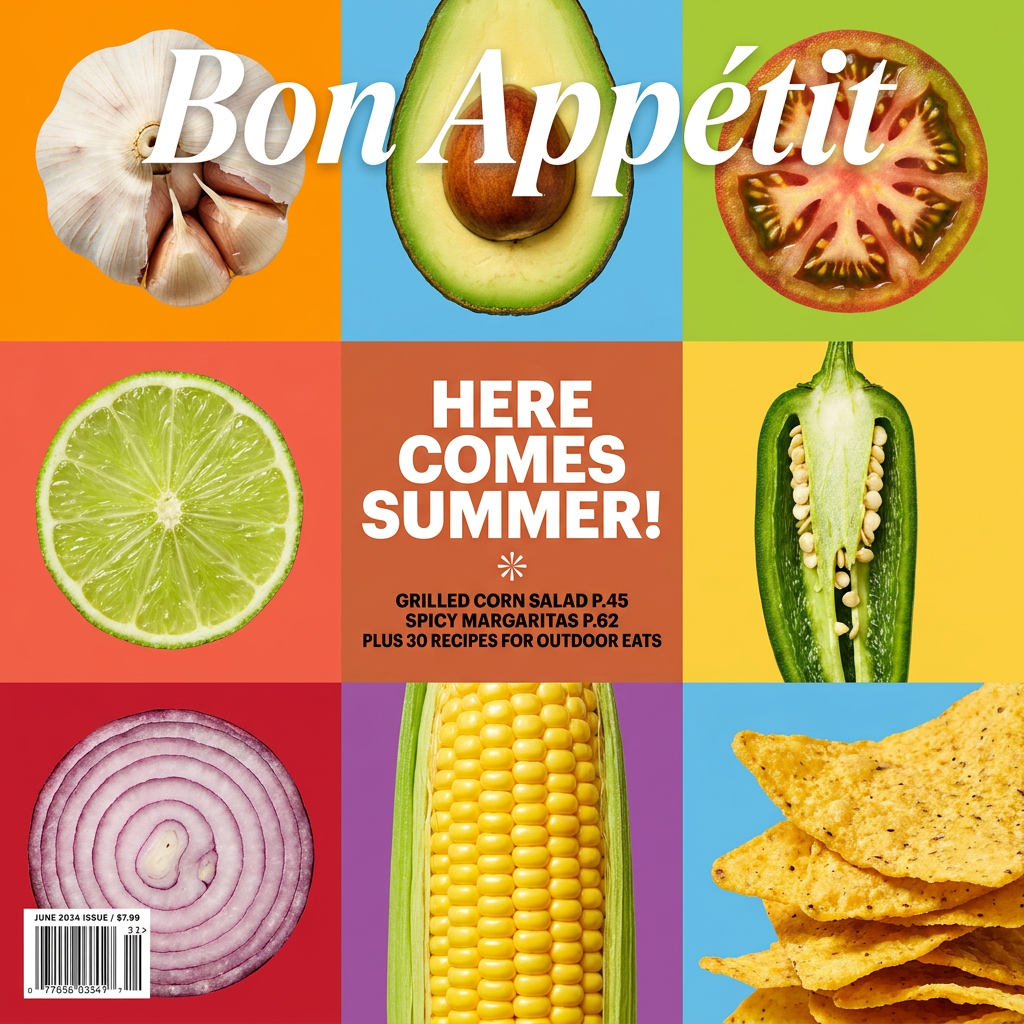
Turn your food shots into a bold, high-end editorial cover. It takes extreme close-ups of your dishes or ingredients and arranges them into a vibrant 3x3 grid that looks straight out of a premium food magazine.
Regenerate using your own assets.
For a memoir, biography, or high-concept non-fiction:
These genres often benefit from a bold, high-fashion aesthetic that puts the author or a strong central concept front and center. An editorial magazine cover style gives you a powerful, premium look with sophisticated typography.
Workflow code: #myup-yk1h-uqy8
High-End Editorial Fashion Magazine Cover

Drop in any portrait and turn it into a high-end editorial magazine cover. It frames your subject beautifully with relaxed, high-fashion posing and soft styling for a polished print aesthetic.
Regenerate using your own assets.
This approach of separating the art from the design is the same professional process used for assets like YouTube thumbnails, where a compelling background image needs to be combined with crisp, clickable text.
The complete workflow: from prompt to final cover
By splitting the process into two distinct steps, you get the best of both worlds: the limitless creative potential of AI for the art and the precision of a design system for the branding and typography. You, the author, remain in control, validating the output at each stage.
Here is the entire process, simplified:
- Step 1: Define Your Brand. In MyUP, set up your Brandkit with your author name's font, your publishing imprint's colors, and any logos. This is a one-time setup.
- Step 2: Generate the Art. Use MyUP's image generator to create your cover illustration. Focus your prompt on mood, composition, and style, and explicitly tell the AI to generate no text.
- Step 3: Choose a Layout Workflow. Select a design workflow template that matches your book's genre—minimalist, editorial, collage, etc.
- Step 4: Combine and Customize. The workflow will load your generated image as the background. You simply type your title, subtitle, and author name into the designated fields. The system automatically applies your Brandkit fonts and colors.
- Step 5: Validate and Export. Review the final cover. Because you used a template, the alignment and spacing are already professional. You just need to approve the result and export your print-ready file.
This is the difference between getting a random image from an AI generator and producing a professional, marketable asset for your book. The AI handles the heavy lifting of illustration; MyUP provides the system to ensure your brand and message are communicated perfectly.
